
ai suite
Designed specifically for the accounting industry
Content creation is challenging, this is especially true in the accounting industry, because so much knowledge resides in the minds of your internal experts. At your fingertips, you’ll be able to plan your topics, gain feedback, source articles, conduct AI led Expert Interviews, create content, get approval, and then publish, all from our platform, simplifying content creation for everyone involved.
Write your own content in no time flat
AI can be used in many ways to assist in tasks such as content creation, optimization, and curation. Our AI Suite includes the Topic Planner, Content Monitoring and the AI Writing Assistant, all specifically designed for the accounting industry. From planning topics to creating outlines, video scripts, draft articles and more, our approach makes content creation more efficient for marketers as well as your internal experts.
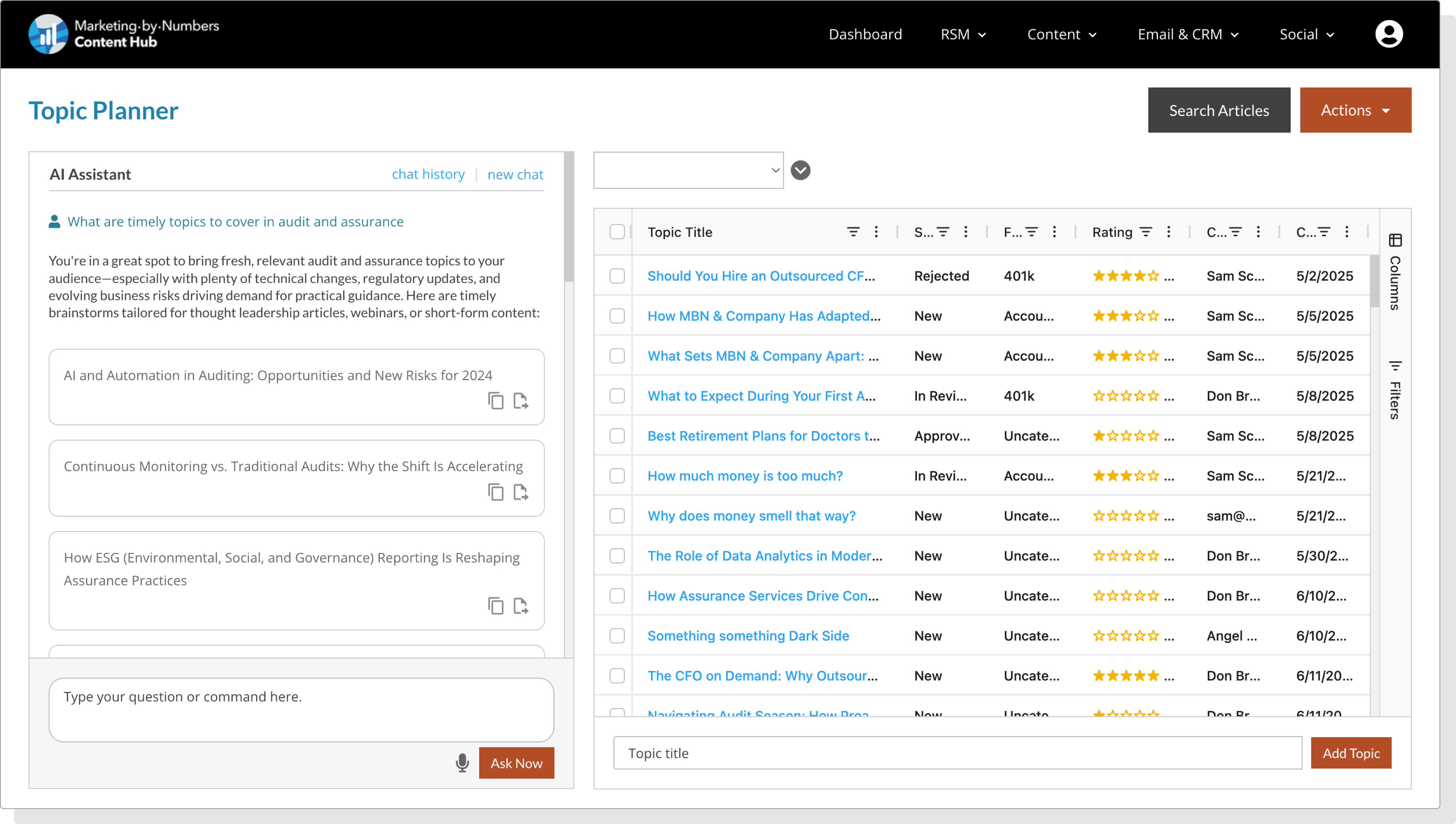
Plan your content marketing strategy with confidence
Save time and stay organized. Use AI to spark ideas, add custom topics, or search sources for more ideas. Plus you can organize topics by folder, search and attach source articles, and gather expert feedback with ease.
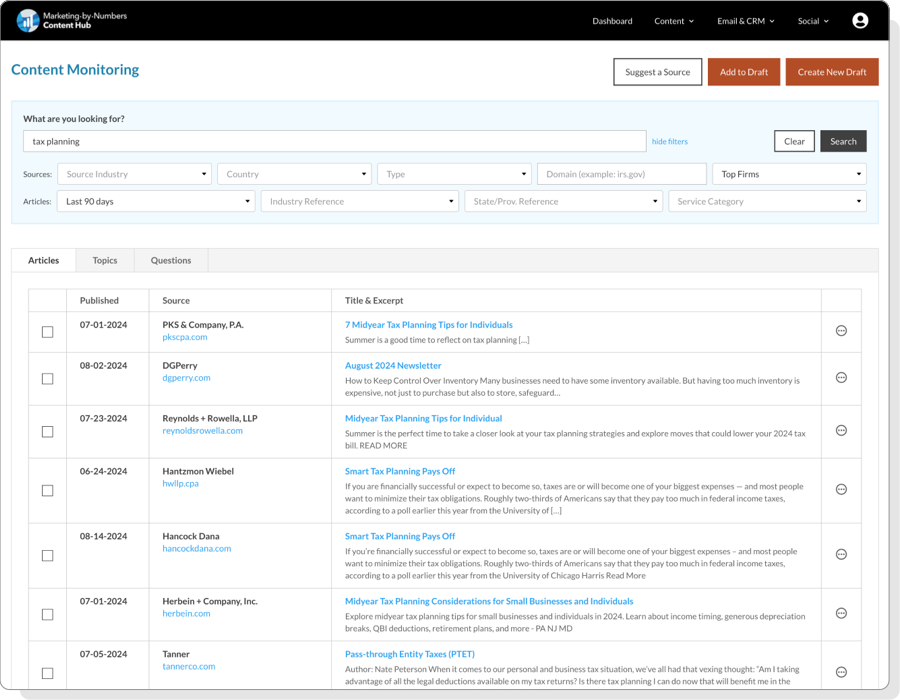
Track trending topics and find resource articles
Use our Content Monitoring feature to help find your next great topic or search for articles from thousands of sources; accounting firms, media and industry vendors. Filter topics by Industry, service line, geography and more. Save your favorite and competitive content sources.
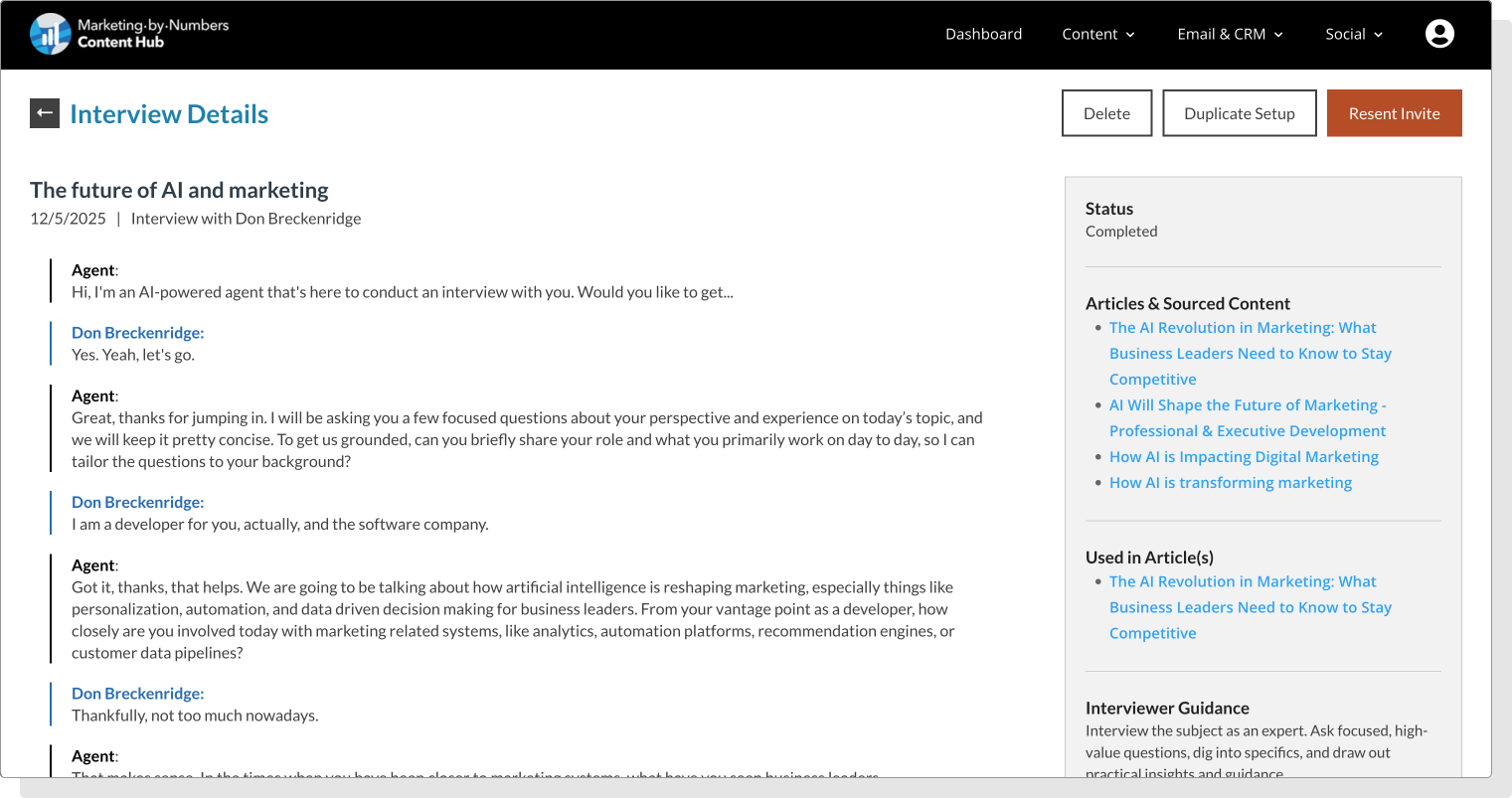
Capture the real voice of your Firm with AI Interviews
Use the MBN AI interview tool for expert insights, Firm updates, client case studies, employee spotlights, and more. All content created through the AI Suite can seamlessly integrate your firm’s expertise and unique perspective.
Simplify content creation
Once you have your topic and sourced material use the AI Writing Assistant to create draft articles, outlines, video scripts, or even help prepare for an expert interview. You can incorporate expert quotes and information unique to your firm’s services and subject matter experts.
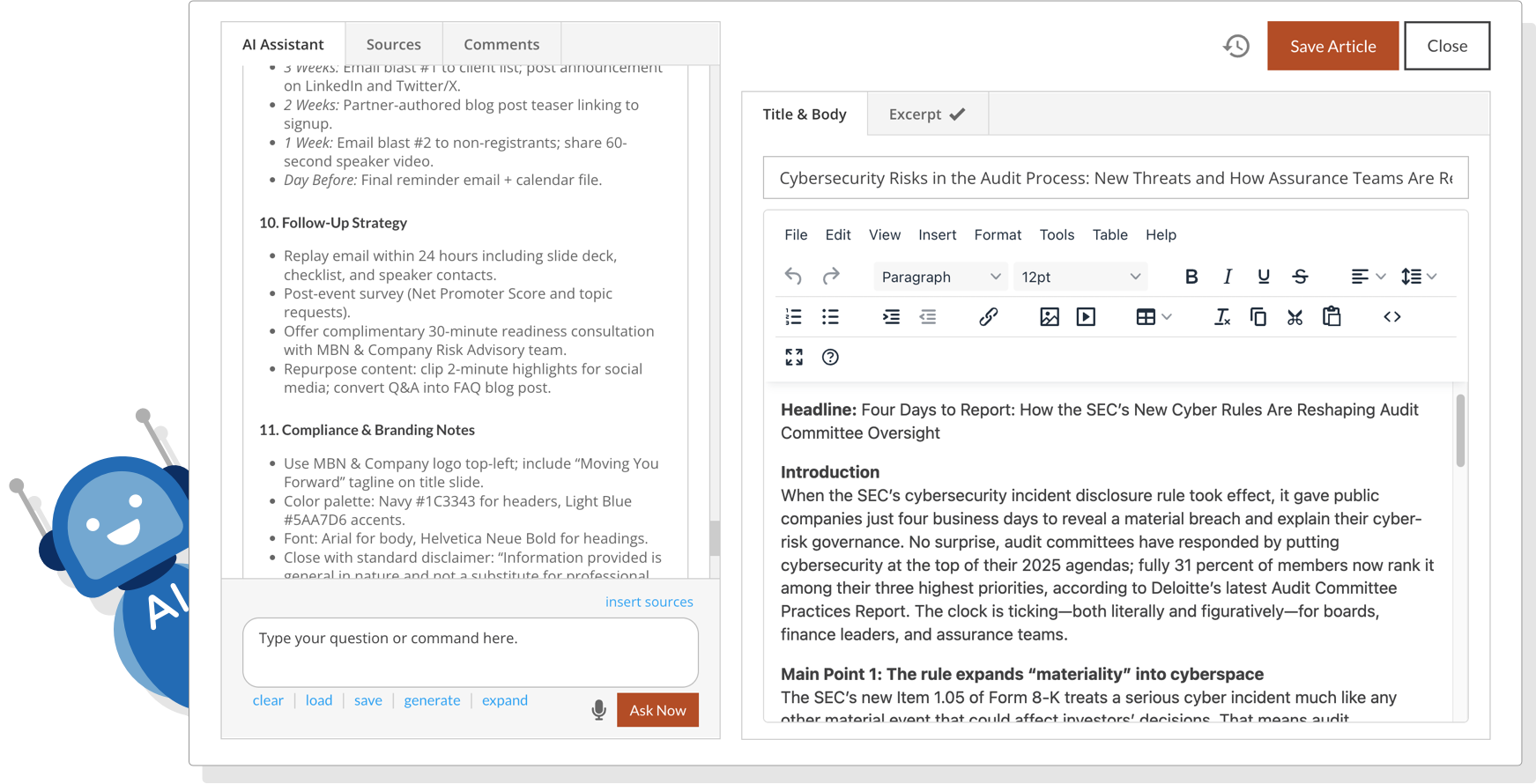
Ask your interactive AI Writing Assistant
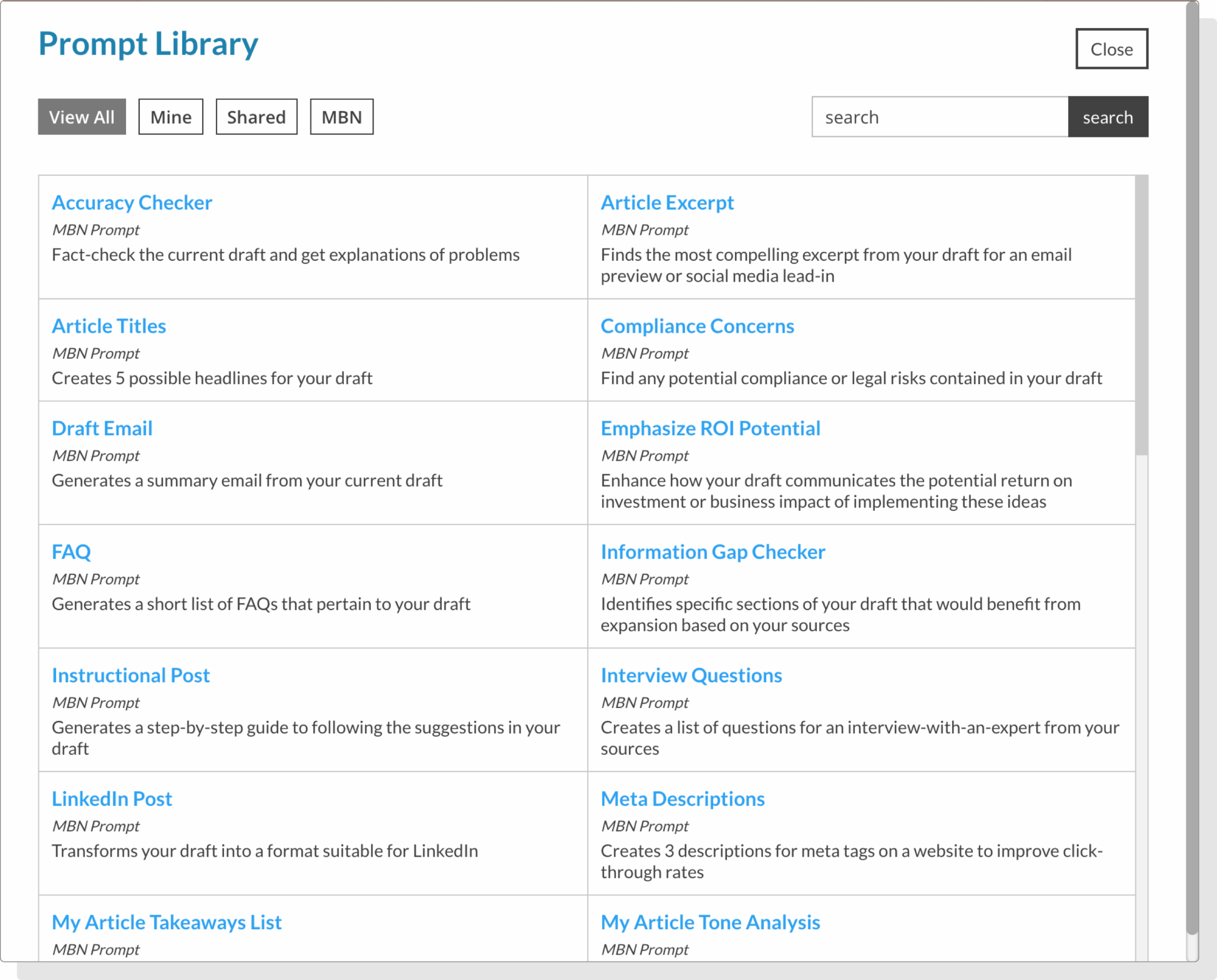
Your AI Writing Assistant is not limited to creating outlines and draft articles. Access a library of ready-to-use AI prompts. Edit, save, and customize your own prompts — and easily share them with others in your firm. If you don’t get the results you’re looking for, ask your AI Assistant to create a revision, expand a section, check for accuracy, or even customize the content to match your firm’s voice.
AI Suite FAQs
Yes, and the writing and accuracy is generally high quality. That said, there can be mistakes and it is always a best practice to review, edit and customize AI-generated content.
It’s designed specifically for accounting firms to turn subject-matter expertise into publishable content. The suite centralizes topic planning, internal feedback, approvals, content creation, and publishing so marketers and SMEs can move faster together.
You can spark ideas with AI, add custom topics, group them in folders, attach source articles, and collect expert feedback in one place—keeping your pipeline organized. Once a topic is ready, click create draft and use the help of the AI Writing Assistant to create your content.
It can produce outlines, video scripts, interview prep notes, and draft sections you can refine with quotes and details unique to your services. You can select a prompt from the Prompt Library or generate prompts. You can save your prompts, and even share them with others in your firm who have access to the platform. The possibilities are endless.
Start with the Topic Planner, gather sources via Content Monitoring, draft with the AI Writing Assistant, route for SME feedback and approval, then publish—all within the platform.
There is no penalty for using AI-generated content; content is rated based on the quality of the content regardless of how it is created. Read more about Google Search’s guidance about AI-generated content.
Three core tools work together:
- Topic Planner (organize and prioritize ideas)
- Content Monitoring (track trends and find source material)
- Content Wizard (Create article using sourced content)
- AI Interviews (Voice with your experts)
- AI Writing Assistant (create outlines, drafts, scripts, and more)
Yes. Content Monitoring searches thousands of sources—from firms to media and vendors—and lets you filter by industry, service line, geography, and more. You can also save preferred and competitive sources. If you can’t find a specific source, you can suggest having them added.
Use the built-in prompt library to tailor tone and voice, edit or save your own prompts, and ask the assistant to revise, expand, fact-check, or align with your style before approval.
Of course! To make it easier, we create an Interviews tab in the draft writer where you can attach an existing transcript or create a new interview directly inside your draft. Plus, while creating the interview, you will have the option to select which draft article you want the transcripts added to.
The Interview feature complements the Topic Planner and AI Writing Assistant. You can use your interview output to inspire articles, quotes, scripts, social content, and more, all from within the same AI Suite workflow.
The AI Interviewer is an audio-based AI-led interview tool that lets the interviewee speak naturally into their microphone while the AI system conducts a guided interview. The AI interviewer generates questions based on the provided guidance and source content, listens to interviewees' responses, interacts with intuitive follow-up questions, and produces a transcript of the interview for use as source material in the MBN AI writing assistant.
It’s ideal for firms that want to simplify the process of capturing insights from internal experts to customize existing content or create original content.
Instructions and guidance are included on the interview page for the interviewee.
The interviewee clicks the start interview button on the interview widget, then clicks the phone button to start the chat with the AI interviewer. The AI Interviewer will start talking, asking the interviewee topic-specific questions one at a time. All the interviewee needs to do is voice their answers into their microphone. The questions and answers appear instantly in the interview widget as a text chat.
Once the interview is completed, the interviewee will receive an email with a link to view their transcript. In the platform, you can access this transcript and use it to create valuable insights articles, blog posts, quotes, and more. Check out What can I create with the interview transcript FAQ for more ideas.
The AI Interviewer will tailor its questions around the content and guidance you provide. Plus, it adapts in real time based on the interviewee's responses.
No. The AI Interviewer is audio-only, there is no video recording. This helps your experts participate more comfortably and focus on the quality of their insights instead of being on camera.
The interview transcript can be used in many ways. Examples include (but not limited to):
- Thought leadership content
- Expert quote in your content
- Newsletter segment
- Website content or FAQs
- Social media posts
- A video script
- Talking points for presentations
- Training materials
- Employee spotlights
- Company news
- Client case study
The transcript becomes a rich source of expert-level content.
All you need is a working microphone. No cameras, no studio setup, and no additional software. The tool runs entirely in a browser. No login is required, the interviewee will receive an email with a link to conduct their interview. Instructions and guidance are included on the interview page for the interviewee.
Absolutely. When setting up the interview, you will have the following options:
- Selecting the type of interview you would like to conduct
- Select source material for the interviewer to use (optional)
- Provide guidance for the interviewer
- Provide guidance for the interviewee
- Select or add contact(s) to interview
- Name the interview
- The transcript can be used as a source in the MBN AI Writing Assistant.
You cannot directly customize or write your own questions for the AI Interviewer, but you can edit the interviewer’s and interviewee’s guidance notes. For the interviewer’s guidance, you can suggest questions you need answered, what subjects to touch on, and interview goals. It’s not guaranteed that the AI interviewer will ask your specific questions, but it will touch on the things you deem important for the interview. For the Interviewee’s guidance, you can advise what the interview goals are to give them a better understanding of what your expectations are.
Yes. Anyone can receive an interview invite, making it easy to capture insights from partners, managers, specialists, and other internal or external subject-matter experts. All that’s required is a first name, last name, and email address to send an interview link.
Each participant receives their own unique interview link, even when completing the same interview. This ensures responses are kept separate and attributed to each individual, so answers are never mixed, and you get clear, person-specific insights from every participant.
Most interviews take 5 to 10 minutes, depending on the subject matter and how detailed interviewee responses are. Interviewees can stop at any time and still receive a transcript. If they are not satisfied with their answers, they can always redo the interview, which will override their original answers.
The AI Interviewer eliminates the need for time-consuming writing sessions or back-and-forth drafting. Experts can speak for a few minutes, and, with the MBN AI Writer, turn their insights into polished, ready-to-use content.